Safety first. The following information is for educational purposes. CNC machining involves high-speed rotating cutters. Always wear eye and ear protection, never leave a running machine unattended, and verify all feeds and speeds for your specific setup.
Chipload calculation for a CNC router rests on one formula: feed rate equals spindle RPM multiplied by chipload multiplied by the number of flutes. Rearrange it and you can solve for any unknown. A 1/4″ two-flute bit at 18,000 RPM and a 0.005-inch chipload wants 180 inches per minute — that number is not a guess, it is arithmetic.
That single equation is the most useful thing on my bench, because it turns “what feed should I use” into a calculation I can check against the chips. I run it constantly across a Shapeoko Pro, an Onefinity, and a couple of Genmitsu machines, and the math is identical on all of them — what changes is how much of the result each machine can actually hold. This guide walks the formula, the rearrangements, the chip-thinning correction that trips people up, and the starting numbers I dial from.
What Chipload Actually Is
Chipload is the thickness of material a single flute carves off in one pass — sometimes written as feed per tooth or inches per tooth. It is the variable that decides whether the cutter is shearing material cleanly or dragging across the surface and generating heat. Every other number is just a way to land it.
Too thin a chipload and the flute rubs instead of cuts: friction, heat, a burned edge in wood, work hardening in metal, and a bit that dulls fast. Too thick and you exceed what the flute can shear and it snaps. Bit makers publish a recommended window for a reason — it is the band where the chip carries heat away and the cutting force stays inside what the flute can take. Calculating chipload is how you stay in that band instead of hoping.
The Formula and Its Rearrangements
The core relationship is short: Feed = RPM × Chipload × Flutes. Feed is in inches per minute, chipload in inches per tooth, RPM in revolutions per minute, and flutes is the number of cutting edges. From that one line you can solve for whatever you do not know.
To find the feed when you know the chipload you want: multiply RPM by chipload by flutes. To find your actual chipload from a feed you are already running: Chipload = Feed ÷ (RPM × Flutes). To find the RPM that lands a target chipload at a feed your machine can hold: RPM = Feed ÷ (Chipload × Flutes). That last form is the one I use most on a hobby machine, because the feed is usually the limited resource and the spindle is the dial I have left to turn.

A Worked Example in Wood
Profiling soft maple with a 1/4″ two-flute upcut, the bit maker lists a chipload window of 0.005 to 0.009 inches per tooth. I aim for the middle, 0.007. At 18,000 RPM the feed would be 18,000 × 0.007 × 2 = 252 inches per minute — far more than my belt-driven machine will hold without chatter.
So I flip the equation. My clean feed ceiling in maple is around 130 IPM, and I want 0.007 chipload, so the RPM I need is 130 ÷ (0.007 × 2) = roughly 9,300 RPM. That is low for a router but fine for a VFD spindle, and it keeps the chipload in the window with a feed the machine can actually deliver. If I had stubbornly run 18,000 RPM at 130 IPM, my real chipload would have been 130 ÷ (18,000 × 2) = 0.0036 — under the window, straight into the burning zone. Same machine, same feed, the RPM dial deciding success.
A Worked Example in Aluminum
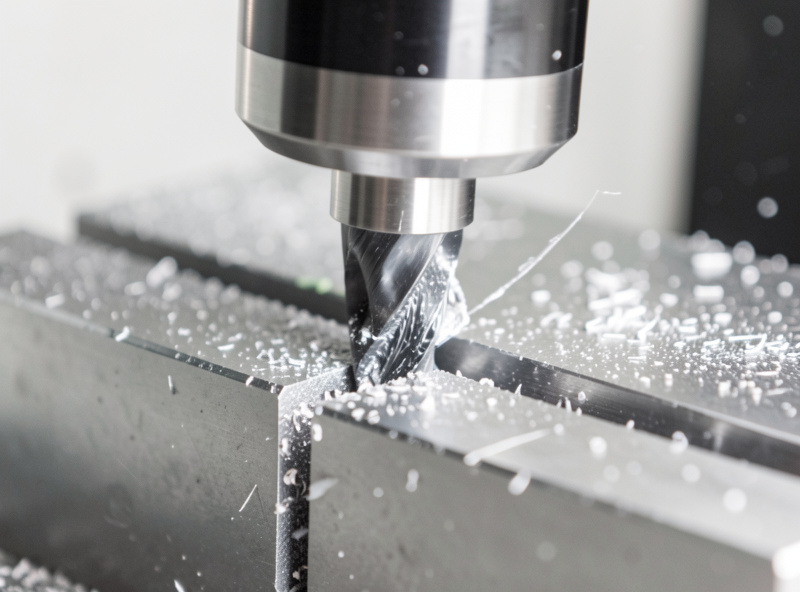
6061 aluminum is where the calculation earns its keep, because the window is narrow and the penalty for missing it is a welded, galled cutter. With a 1/4″ single-flute aluminum bit I target around 0.002 inches per tooth. At 16,000 RPM that gives a feed of 16,000 × 0.002 × 1 = 32 IPM — deliberately modest, with air blast to clear chips and a shallow depth of cut.
Single-flute matters here: with one cutting edge, the feed for a given chipload is half what a two-flute needs, which keeps the spindle load and chip-evacuation demand sane on a hobby machine. The full aluminum recipe — depth of cut, adaptive strategy, air versus mist — lives in the aluminum feeds and speeds guide, but the chipload arithmetic is the same equation you used on wood.
The Correction Nobody Mentions: Chip Thinning
Here is the trap that breaks the formula in practice. The equation assumes the cutter is engaged at least halfway into the material (a stepover of 50 percent or more). When the radial engagement drops below that — a light finishing pass, or an adaptive toolpath running 10 to 15 percent stepover — the actual chip comes out thinner than your programmed chipload. The flute is only kissing the edge of the cut, so each chip is a sliver.
Left uncorrected, that thinning drops you straight back into the rubbing-and-burning zone even though the math said you were fine. The fix is chip-thinning compensation: at low stepover you increase the programmed feed so the actual chip returns to the target thickness. Fusion 360 does this automatically when you enter a real stepover, which is one reason adaptive clearing can run such aggressive feeds — the CAM is already compensating. I cover how that plays out in the adaptive clearing feeds and speeds guide.
Starting Chiploads by Bit Diameter
Chipload scales with bit diameter — a thin 1/8″ bit cannot take the same bite as a 1/4″ without snapping, because its core is so much weaker. These are the starting numbers I dial from, then verify by reading the chips. Always cross-check your specific bit maker’s range; brands differ.
| Tool diameter | Softwood (in/tooth) | Hardwood (in/tooth) | 6061 aluminum (in/tooth) |
|---|---|---|---|
| 1/8″ (3.18 mm) | 0.003–0.006 | 0.002–0.005 | 0.0005–0.0015 |
| 1/4″ (6.35 mm) | 0.005–0.011 | 0.005–0.009 | 0.001–0.003 |
| 3/8″ (9.53 mm) | 0.007–0.013 | 0.006–0.011 | 0.0015–0.0035 |
| 1/2″ (12.7 mm) | 0.008–0.015 | 0.007–0.012 | 0.002–0.004 |
The pattern is worth internalizing: smaller bit, smaller bite, and metals an order of magnitude below wood. When I step a job down from a 1/4″ to a 1/8″ bit for detail work, I do not just change the tool — I recalculate, because the same feed that was perfect on the quarter-inch will overload the eighth. The end mills guide covers how diameter and flute count interact, and the feeds and speeds chart has the broader lookup.
The Hobby-Machine Reality
Calculators give you a number; your gantry decides whether you can use it. The recurring problem on hobby CNC is that the ideal feed at high RPM is faster than the machine can move without chatter or lost steps. When that happens, do not force the feed — lower the RPM until the achievable feed lands the chipload in the window, exactly like the maple example above.
There is a floor, of course: drop the RPM too far and a router loses torque, while a VFD spindle has its own minimum stable speed. But within the usable band, treating RPM as the adjustable variable rather than a fixed 18,000 is what separates a cut that throws clean chips from one that polishes the work and cooks the bit. Once you have a calculated starting point, the chips, the sound, and the edge tell you the rest — the full method is in the feeds and speeds mastery hub, and the spindle RPM by material guide gives sane RPM bands to start from. For the fundamentals behind it all, the tooling fundamentals guide is the foundation.
Frequently Asked Questions
What is the chipload formula for a CNC router?
Feed rate equals RPM multiplied by chipload multiplied by the number of flutes. Rearranged, chipload equals feed divided by RPM times flutes, and the RPM you need equals feed divided by chipload times flutes. All three forms come from the same single equation.
How do I calculate the feed rate from a target chipload?
Multiply your spindle RPM by the target chipload by the number of flutes. For example, a two-flute bit at 18,000 RPM and a 0.005-inch chipload gives 18,000 times 0.005 times 2, which is 180 inches per minute.
What chipload should I use for a 1/4 inch bit in hardwood?
A starting window of about 0.005 to 0.009 inches per tooth works for a 1/4-inch bit in most hardwoods. Aim for the middle, then verify by reading the chips and adjust. Always cross-check your specific bit maker’s recommended range.
What is chip thinning and when do I correct for it?
Chip thinning happens when radial engagement drops below 50 percent of the bit diameter, such as a finishing pass or an adaptive toolpath. The actual chip comes out thinner than your programmed chipload, so you increase the feed to compensate. CAM like Fusion 360 does this automatically.
Why is my calculated feed rate too fast for my machine?
Because the ideal chipload at high RPM often demands a feed your hobby gantry cannot hold without chatter. The fix is to lower the spindle RPM until the feed your machine can actually achieve lands the chipload back inside the bit maker’s window.
Does a single-flute or two-flute bit change the chipload?
It changes the feed, not the chipload target. A two-flute bit needs double the feed of a single-flute to hit the same chipload, because two edges share the work. Single-flute bits suit plastics and aluminum where chip clearance and lower feeds matter.
Related Guides
- CNC Feeds and Speeds Mastery — the full chipload-first system
- Adaptive Clearing Feeds and Speeds — where chip thinning matters most
- Hardwood vs Softwood Feeds and Speeds — chipload by density
- CNC End Mills — how diameter and flutes change the math
- CNC Spindle RPM by Material — sane RPM bands to start from